What You Will Build & Master
- Pin a native SwiftUI + AppKit teleprompter flush at y = 0 directly beneath your MacBook webcam lens and drive OBS Start/Pause/Stop via zero-dependency WebSocket v5.
- Combine Metal Whisper large-v3-turbo, Meta MMS_FA 20ms forced alignment, 10ms RMS silence carving, and local Ollama Gemma 4 to prune fillers, pauses, and retakes automatically.
- Master voice once with ClearerVoice MossFormer2_SE_48K + -14 LUFS and stamp container metadata so downstream 3D Studio & Eye Contact renders stream-copy audio cleanly.
- Use the copy-paste Swift/Python skeletons and Master Agent Prompt Playbook to generate, compile, and Keychain-sign your own standalone macOS .app without Xcode.
Table of Contents (6 Chapters)All UnlockedCh. 1 Free
1. Architecture & How the Local Mac Video Studio App Works
Recording a short talking-head video usually forces a messy loop: read off a floating note app, lean over to click record in OBS, stumble mid-sentence and start over, upload huge raw clips into a cloud video editor, pay a monthly subscription to strip dead pauses and filler words, clean room echo in another tool, and finally export for background replacement.
Instead of splitting every step across paid cloud services, I built a native macOS SwiftUI + AppKit companion app backed by local open-source AI models on Apple Silicon. It runs 100% locally with zero cloud uploads, zero watermarks, and zero monthly fees, and pairs directly with the local 3D Studio + MLX Eye Contact renderer documented in my Local AI Video Editor guide.
How This Blueprint Works: Rather than dumping a rigid monolith you cannot maintain, Chapters 2 through 6 give you the exact architecture, local open-source setup commands, clean Swift & Python skeleton contracts, and copy-paste coding-agent prompts so you (or your AI coding agent) can build and customize your own native Mac studio app in under an hour.
End-to-End 6-Stage Local App Architecture
Why Split Into Two Native Modes + One Local AI Backend
- Mode 1: Flush
Y = 0Bezel-Pinned Teleprompter HUD (Recording Layer):- OBS Studio remains the sole
1080pcamera and mic recorder (never duplicated in the app, zero camera lock conflicts). - A custom AppKit
NSWindowpins the reading strip flush aty = 0directly beneath the MacBook webcam lens so your eyes stay centered while reading. - Pressing
Spacetriggers a 3-2-1 countdown, starts OBS recording via local WebSocket v5 (127.0.0.1:4455), and scrolls smoothly. PressingSpaceagain pauses/resumes both OBS and scroll. TappingRdrops an exact retake timestamp and rewinds two lines without stopping OBS.
- OBS Studio remains the sole
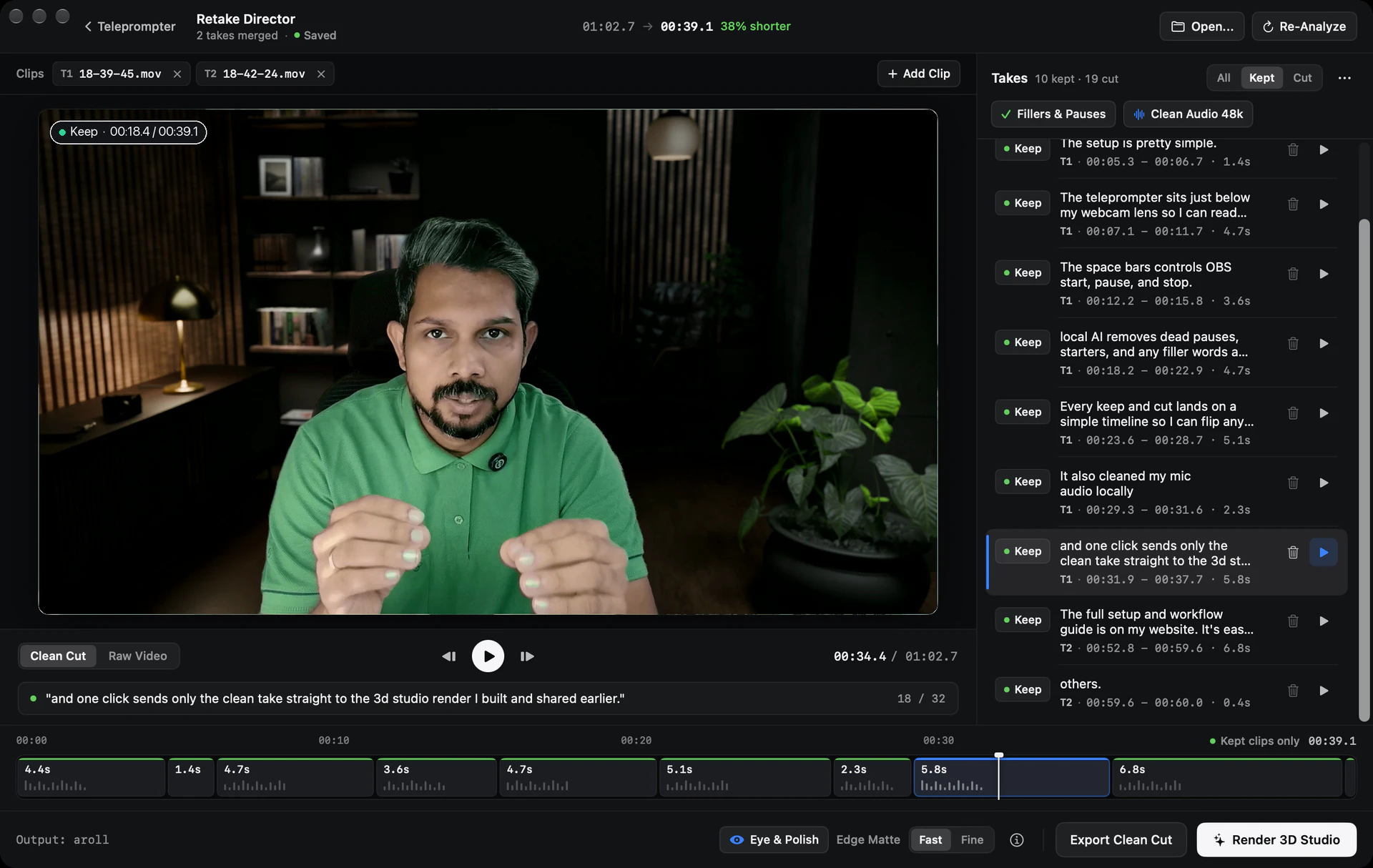
- Mode 2: Retake Auto-Director (Editing & Broadcast Audio Layer):
- Pressing
Enterstops OBS and runs a fast local Python analysis pass (~3.4sfor a 62.7s 2-take recording on Apple Silicon). - Metal
Whisper large-v3-turbotranscribes verbatim (even when you go off-script), Metatorchaudio MMS_FAlocks every word to exact20msphoneme boundaries, a local OllamaGemma 4model flags vocal fillers, stutters, and abandoned restarts while protecting meaning-bearing words, and a10msRMS energy carver cuts dead pauses (>= 0.34s) and mic sniffs. - Every
KeepandCutlands on an interactive timeline where you can preview the clean cut live, flip any clip in one click, merge multiple takes, and export a click-free clean cut with single-passMossFormer2_SE_48K+-14 LUFSbroadcast audio (tagged in container metadata so downstream studio renders stream-copy audio with zero double processing).
- Pressing
- One-Click Stage 3 Handoff (3D Studio + MLX Eye Contact):
- Because dead air and bad takes are already stripped before matting, feeding the clean cut straight into the local 3D Studio + MLX Eye Contact pipeline saves
~35% to 40%render time automatically.
- Because dead air and bad takes are already stripped before matting, feeding the clean cut straight into the local 3D Studio + MLX Eye Contact pipeline saves
Open-Source Model Stack & Licensing Overview
Every model runs locally on your Mac and is downloaded directly by you from its official upstream repository (no third-party weights are bundled or redistributed):
| Component | Role in the App | Local Engine | Upstream License |
|---|---|---|---|
OBS Studio (WebSocket v5) |
1080p camera & mic recording | Native macOS | GPL-2.0 (talked to over local WebSocket API) |
whisper.cpp (large-v3-turbo) |
Off-script verbatim transcription (~1.1s) |
Apple Metal | MIT |
Meta torchaudio MMS_FA |
20ms word/phoneme boundary alignment (~1.6s) |
PyTorch MPS | BSD-2-Clause code / CC-BY-NC-4.0 weights |
Ollama + Gemma 4 (26B) |
Semantic filler, stutter & restart guard (~5.8s) |
Apple Metal | MIT (Ollama) / Gemma Terms |
ClearerVoice MossFormer2_SE_48K |
48 kHz neural speech dereverb & noise removal | PyTorch MPS / CPU | Apache-2.0 |
| Stage 3 Back-End (Optional) | 3D Studio (SAM 3 + MatAnyone 2 + Depth Pro 2 + MLX LivePortrait) |
MPS + CoreML + MLX | Personal / Creator use (mixed permissive & NC weights) |
Apple Silicon Requirements & Measured Speed
| Resource | Recommended | Minimum | Real Measured Behavior (M5 Max, 62.7s Raw 2-Take Session) |
|---|---|---|---|
| Mac Hardware | Apple Silicon M2 / M3 / M4 / M5 (macOS 14+) |
M1 Apple Silicon (macOS 14+) |
Native arm64 SwiftUI binary compiled directly via swiftc (no Xcode IDE project required) |
| Unified Memory | 32 GB+ (for smooth local 26B LLM + Stage 3) |
16 GB (use smaller Ollama model or rules-only mode) |
Mode 1 + Mode 2 analysis runs in 3.4s, trimming 01:02.7 raw footage down to 00:39.1 (38% shorter) |
| Audio & Clean Cut Export | ffmpeg + MossFormer2_SE_48K |
Same | ~11s to clean 48k voice, normalize to -14 LUFS, and splice click-free 16ms crossfades |
| Stage 3 3D Studio + Eye Polish | 32 GB+ RAM, 20 GB+ free NVMe scratch |
24 GB RAM (close browsers) |
Fast Edge Matte (720p AI + GPU edge restore -> 1080p output) + MLX fp32 Eye Contact & Cinema Polish |
What You Will Unlock in Chapters 2 to 6
- Chapter 2: Complete Apple Silicon environment setup (
Homebrew,uv,whisper-cpp,torchaudio,Ollama Gemma 4,ClearerVoice) plus exact OBS Studio WebSocket v5 & Hybrid MOV configuration. - Chapter 3: Mode 1 blueprint with the
BezelOverlayWindow(Y = 0) AppKit trick, a clean zero-dependency Swift OBS WebSocket v5 client skeleton (CryptoKit+URLSessionWebSocketTask+ auto-launch), and a copy-paste agent prompt to build your own teleprompter HUD. - Chapter 4: Mode 2 Retake Auto-Director architecture, the
retake_plan.jsonschema, clean Python skeletons for10msRMS silence carving,Gemma 4structured semantic pruning, and single-passcreator_studio_audio_masteredstream-copy protection, plus the Director UI build prompt. - Chapter 5: One-click Stage 3 handoff (
Edge Matte Fast | Fine,Eye & Polish, async SwiftProcesslog streaming) and how it plugs cleanly into the Local AI Video Editor 3D Studio + MLX Eye Contact pipeline. - Chapter 6: Native
swiftccompile + Keychaincodesignscript, a Master End-to-End Coding Agent Prompt to build your own app from scratch, forensic troubleshooting table, and licensing guidelines.
Inside Chapters 2–6 (Included Free With Email Unlock)
Click any chapter to unlockLoading your unlocked Chapters 2–6…
Unlock Chapters 2–6 + All Future Engineering Guides
We’ll email you a 1-click link to unlock all remaining chapters right here in your browser for 90 days, plus activate Ashutosh’s free AI Compass daily AI news emails (1-click unsubscribe anytime).
Image-to-3D Character, Rigging & Real-Time Motion Handbook
One unified 22-chapter engineering handbook taking a single 2D concept to a 60 fps browser-native game character: Blender 5.2+ rigging & facial blink, 234 CC0 1.0 animations, analytical Hinge IK, 13-obstacle parkour, sword combat, Verlet cloth, adaptive Web Audio, and PS5 DualSense haptics.
Build Your Own Local AI Video Editor (SAM 3, MatAnyone 2, 3D Studio & Apple MLX)
Stop paying monthly for cloud video editors. One complete 8-chapter handbook with real Apple Silicon system requirements and runnable scripts: bezel-locked teleprompter, flat-RAM SSD-memmap v6.2 Meta SAM 3 + MatAnyone 2 matting, Blender 5.2 Cycles Charcoal-Obsidian 3D studio with 32-bit EXR Z-depth parallax & Layer 2 damped head-tracking gimbal camera, native Apple MLX fp32 LivePortrait eye contact, Cinema FX3 face polish, MossFormer2 48 kHz audio, Metal Whisper captions, and zero-banding 4K60 16:9 + 9:16 masters.